Thursday, January 5, 2017

Unit 2: H200: System concepts

Unit 2: Lesson 2


*****************************************************************************
OVERVIEW: This lesson describes the Linux operating system requirements that have to be fulfilled before you can start the installation of an SAP HANA system. This lesson does not replace the “SAP HANA Server Installation and Update Guide" for SPS11 and the SAP HANA installation SAP Notes.

******************************************************************************
USE CASE:
*****Linux OS requirements before installing SAP HANA*****

*********************************************************************************

1)      Explain the SAP HANA system concepts and system types
2)      Clarify the SAP HANA system concepts and system types
3)      Explain the required file system structure and directories and their recommended sizes

1)      Explain the SAP HANA system concepts and system types

·         Single-Host System
·         system is running entirely on one host and the server needs to handle the full query load


·         Multi-Host System (More than one host)
·         Can be configured as active worker hosts or idle standby hosts
·         Means load can be balanced between different hosts.
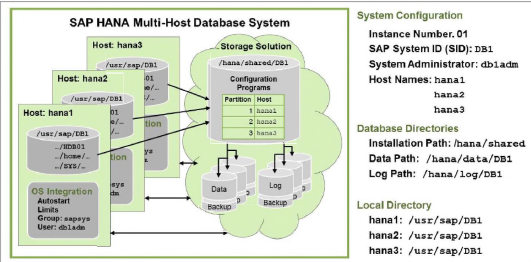


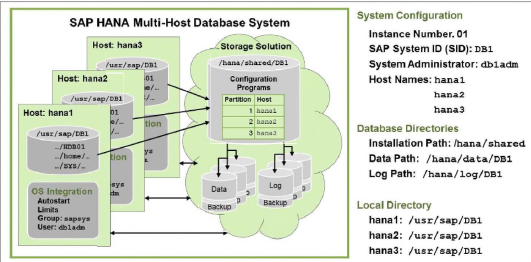
2)      Clarify the SAP HANA system concepts and system types


A)      Host
a.       hardware and operating environment in which the SAP HANA database runs
                                                               i.      resources and services
1.       CPU, Memory, Network, and storage
b.       supported on:
                                                               i.      SUSE Linux Enterprise Server
                                                             ii.      Red Hat Enterprise Server
c.       storage for an installation does not have to be on the host
                                                               i.      can be in shared storage
d.       for multi-host SAP HANA systems
                                                               i.      shared storage or storage that is accessible on-demand from all hosts is required
B)      System
a.       One or more instances with the same SAP system ID and instance number
b.       System = SAP HANA database
c.       If SAP HANA system has more than one instance
                                                               i.      Distributed over several host
d.       SAP system ID
                                                               i.      Identifier for the SAP HANA system
C)      Instance
a.       set of SAP HANA system components that are installed on one host
b.       system can be distributed as several instances among several hosts, but each instance in a multi-host system must have the same instance number.

3)      Explain the required file system structure and directories and their recommended sizes

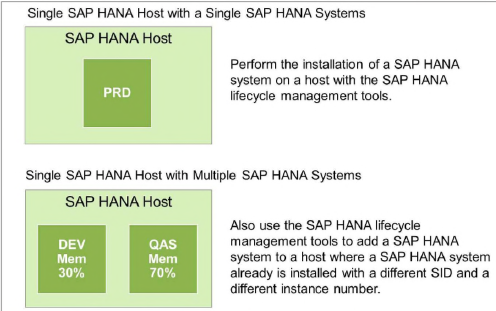
Standalone SAP HANA System with Single-SID and Multiple-SID installations
Hardware Rqrmts:
·         20GB Ram in total for software
·         15 GB for the basic software
·         5 GB for programs
·         Space for trace files
·         Addt’l storage for data and log volumes varies

SAP HANA NETWORK CONNECTION RQRMTS:
·         Dedicated server network communication of 10GBits/s between the SAP HANA landscape and the source system for efficient data replication

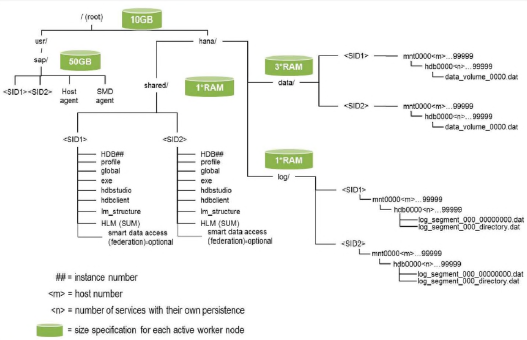
Important Directories and their Sizes:

PIC


·         SAP HANA system in a production environment must not share any infrastructure with another SAP HANA system
·         Hosts running more than one SAP HANA system (sometimes referred to as multi-SID installations) can only be used for
·         Non-production purposes:
·         Development
·         QA
·         Testing


·         production systems with high availability
·         possible to share some temporarily unused resources from the standby hosts.
·         as the standby resources are needed, they must become exclusively available for the production system and are no longer shared


Tuesday, January 3, 2017

Interview Questions

https://www.pinterest.com/saphanacentral/interview-qa/

https://www.pinterest.com/saphanacentral/

http://career.guru99.com/top-50-sql-question-answers/


http://www.w3schools.com/sql/

http://career.guru99.com/top-50-sql-question-answers/

H100 Lumira

Lumira

=Lumira Server:  Explore data: share with teammates
=Lumira Cloud:  Acquire data -> Build visualization -> explore the data -> and share with your teammates


=Lumira Desktop: Acquire data -> Enrich Data -> Build Visualizations -> Explore data -> Share with teammates


Acquire: 
-data from Excel, CSV, HANA, SQL, and BI universes (SAP BW BEx connectivity planned)
-Stored in columnar store for lightning fast experience
-Merge/Append datasets


Enrich:
-Combine multiple sources without scripting
-Cleanse, add calculations, custom groupings, etc.
-Enrich with geo and time hierarchies

Visualize + Explore
-Insight from structured and unstructured data
-Flexible and iterative workflow makes discovery insight engaging and powerful
-Filter/Exclude/Rank/Sort

Share:
-Share visualization by email
-Share datasets to Lumira Cloud and Server
-Publish as HANA view
-Save to BIP as Explorer Info Space

H100 BO Analysis for OLAP/BEX

BO Analysis for OLAP

·         Dedicated Ad-Hoc OLAP  client for Business users to analyze OLAP data
·         Interoperability between designer and ad-hoc client
·         Simultaneous connection to multiple queries from different data providers
·         Report off analytic views/calculation views
·         Web based applications

·         Save/open a workbook to/from the SAP BI platform server
·         Undo/Redo
·         Define style sets for crosstabs
·         Swap axes
·         Analyze data with the design panel
·         Filter members
·         Sort data by members and by measures
·         Insert Charts
·         Insert filter components
·         Convert crosstab cells to formula
·         Create Presentations
·         Pause/Refresh


Access Analytics and Calculation Views from Analysis Edition from OLAP via OLAP Connection defined inside the Central Management Console of BO Enterprise Server

BO Analysis, edition for OLAP = Multidimensional data analysis within a web-based environment


------------------------------------------------------------------------------------------
Org has got a vast amount of data to explore the data and find patterns to which no set report exists
------------------------------------------------------------------------------------------

Explain when to use Bex on top of HANA
Explain how to configure SAP BO to use HANA
Create an Explorer Info SPace to Explore HANA data within Explorer


1)Explain when to use Bex on top of HANA
·         Key word search to find bzn info
·         Answers on the fly and investigates questions

·         Searches directly on pre-indexed data
·         No previous reports or metrics need to exist
·         Fast exploration
·         Searches across all data sources
·         Any universe accessible source
·         Any netWeaver BW Accelerator accessible source


2) Explain how to configure SAP BO to use HANA
Connection defined in IDT
View created from HANA Studio
BO Explorer = Search relevant information and direct exploration of data


3) Create an Explorer Info Space to Explore HANA data within Explorer


1) Start SAP BI LaunchPad
2) When prompted to logon to BI Launchpad, enter the following information
3) In the My Application menu, choose Explorer
4) Choose manage Spaces
5) Expand the folder SAP Hana appliance -> HDB
6) Select the Calculation View 
7) to create a new info space on this calculation view, choose new
8) in the properties tab, define the following properties
         Measure
        Attribute
9)To index the new Infospace, in the Action column choose index now
10)Back to the home tab, to update the list of info spaces, choose refresh list
11) open the info space:
12) ready to explore the data set

H100 SAP BO Tools available/descriptions

SAP BO: 5 BI requirements:

·         Reporting: Crystal Reports
·         Dashboards and Visualization:  Dashboards, DesignStudio
·         Interactive Analysis:  WebIntelligence
·         Advanced Analysis:  Analysis for MS office/for OLAP
·         Search and Exploration:  Explorer, Lumira


Source Systems and data sources needed to be connected:
1)      Reporting Client Deployment (desktop, Web, MS Office Integation)
2)      Reporting Client Technology (HTML5, Flash, mobile requirements)
3)      Reporting Client features (hierarchies, variables, calculations, graphical visualization, Export to PDF/XLS, etc.)
4)      Deployment reporting content (NetWeaver Porta, BO BI Platform, etc.)


SAP Crystal Reports for Enterprise:
1)      Consume attractive, personalized dashboards online or offline
a.       Access to personalized, flash-based dashboards
b.       Secure visualizations anywhere- portal, reports, PDF, MS Office documents
2)      Empower business users with interactive information
a.       Powerful “what-if” analysis with sliders and controllers
b.       Ability to drill-down into details
c.       Pre-built components, skins, maps, charts, gauges, and selectors

Dashboarding and Data Visualization -SAP BO dashboard design

1)      Empower business with easy to use reporting
a.       Intuitive, web-based interface with offline capabilities
b.       Multi-source access
c.       Interactivity with filtering, ranking, sorting, calculations
d.       Data lineage
2)      Lighten IT workload
a.       Self-service data access and reporting
b.       Controlled and secure access with tight BI platform integration
c.       Intuitive, business-centric view of info. With universes

Ad Hoc Querying and Reporting- SAP BO Webi
1)      Office based analysis and hierarchical navigation of RT data in HANA
a.       Business analyst interface, integrated in MSFT office, for analyzing data
b.       Hierarchical navigation of HANA views
c.       Calculations pushed into the HANA engine or in the local document
d.       Excel rendering and storage of data for sharing with colleagues
2)      Key capabilities on HANA
a.       Direct access to Hana views
b.       Support of variables
c.       Support of hierarchies
d.       Full HANA online experience
e.       SSO to HANA

SAP BO for MS Office

1)      Bring BI to all Business users
a.       Data exploration/visualization
b.       Fast response/simplicity/speed of search
c.       Easy and efficient to manage/scale

SAP BO Explorer

1)      Discovery and visualization of RT data
a.       BA interface for visualization and data exploration
b.       Automated/user defined enrichment of information
c.       Dynamic filtering of tables and visualizations
2)      Key capabilities on HANA
a.       Support of variables/level based hierarchies
b.       SSO to HANA

c.       Direct access to HANA views

Data Connectivity HA100

SAP HANA DB Connectivity Options


SAP BO BI Solutions Architecture:
Connectivity to SAP HANA 


ODBO - OLE DB for OLAP

1)      ODBO – OLE DB for OLAP
a.       Microsoft-driven specification for Multidimensional reporting
b.       Request are sent to the DB via MDX
2)      ODBC -Open Data Base Connectivity
a.       Microsoft-driven specification for Relational reporting
b.       DB requests are made via SQL
c.       Heavily adopted in industry
d.       No longer Microsoft centric -Unix and Linux drivers exist for ODBC
3)      JDBC – Java Data Base Connectivity
a.       Relational reporting driver specified by the java community. Popular on Unix platforms
4)      BICS – BI Consumer Services
a.       SAP proprietary interface that offers advantages for OLAP access over MDX on multidimensional reporting objects
b.       Common driver technology used by SAP BO Analysis, office edition and semantic layer based BO clients for connectivity to SAP NetWeaver BW


1)      What is the connection and requests sent for:
 Crystal Reports 2011 vs CR 2013 vs CR for enterprise to SAP HANA DB?

1)      CR 2011: JDBC + SQL
2)      CR 2011: ODBC + SQL
3)      CR Enterprise: JDBC/ODBC + SQL

2)      What is the connection and request for Webi and Dashboards to SAP HANA DB?
a.       JDBC/ODBC + Semantic Layer (relational Universe) + SQL

3)      What is the connection and request for Design Studio to SAP HANA DB?
a.       BICS/JDBC + SQL

4)      What is the connection and request for Analysis Office to SAP HANA DB?
a.       ODBC/BICS + SQL

5)      What is the connection and request for Analysis OLAP to SAP HANA DB?
a.       BICS/JDBC + SQL

6)      What is the connection and request for BEX(Explorer) to SAP HANA DB?
a.       JDBC + SQL

7)      What is the connection and request for Lumira to SAP HANA DB?

a.       JDBC + SQL